
If you're paying for a gigabit connection but experiencing the speeds of a decade ago, your hardware is the bottleneck, not your internet service provider. Most Australians assume any retail unit will suffice, only to be met with persistent Wi-Fi dropouts and throttled performance once 50 or more IoT devices connect. Finding the right modem for nbn is no longer a matter of simple brand preference. It requires a precise match between your hardware and the specific NBN technology delivered to your premises.
We recognize that the terminology surrounding VDSL2, HFC, and Ethernet WAN can be unnecessarily complex. This guide simplifies the selection process by showing you how to identify the exact hardware required to eliminate speed bottlenecks and maximize your plan's potential. You'll learn how to move beyond basic ISP equipment toward high-performance, professional-grade solutions that support a true gigabit-ready home. We'll preview the critical 2026 hardware standards, including Wi-Fi 7 capabilities and multi-gigabit port configurations, to ensure your network remains stable and fully future-proofed.
Key Takeaways
- Identify your specific NBN technology type, such as FTTP or FTTN, to ensure your hardware is fully compatible with your delivery method.
- Understand the technical differences between VDSL2 and Ethernet WAN to select a high-performance modem for nbn that eliminates speed bottlenecks.
- Determine the CPU and RAM specifications required to handle NBN 1000 plans without the performance throttling common in standard ISP equipment.
- Learn how to implement professional features like 802.1Q VLAN tagging and SFP+ ports for a more stable and efficient internal network architecture.
- Future-proof your connectivity by choosing hardware that supports 2026 standards, including Wi-Fi 7 and high-density IoT device management.
Understanding NBN Connection Types and Hardware Requirements
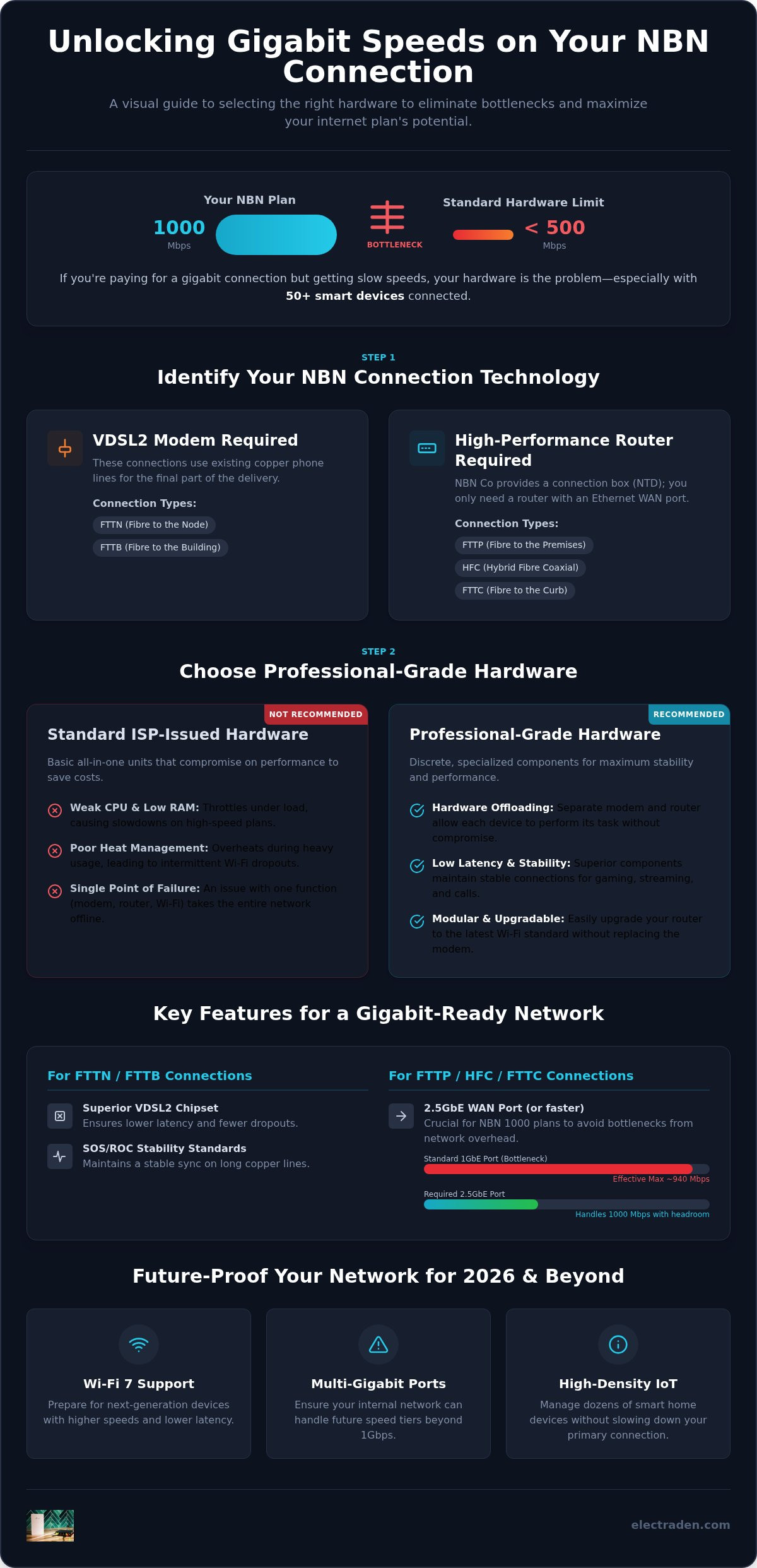
Australia's National Broadband Network is a collection of distinct technologies rather than a single unified system. Hardware must match delivery. This multi-technology mix means your choice of a modem for nbn depends entirely on how the service enters your property. Using the wrong hardware leads to sync issues or significant speed degradation. You must first identify if your connection is Fibre to the Premises (FTTP), Node (FTTN), Building (FTTB), Curb (FTTC), or Hybrid Fibre Coaxial (HFC) before selecting your gateway.
Standard ISP-issued hardware is typically designed for the lowest common denominator. These all-in-one gateways frequently struggle with heat management and packet processing, causing bottlenecks even when the NBN line itself is performing well. It's vital to distinguish between the NBN Connection Box, also known as a Network Termination Device (NTD), and your own router. For most modern connections, NBN Co provides the NTD. Your responsibility is to provide a high-performance router that can handle the throughput without failing under load. Selecting a specialized modem for nbn ensures you aren't leaving speed on the table.
FTTN and FTTB: The Need for VDSL2 Compatibility
Fibre to the Node and Building connections rely on existing copper telephone lines to deliver data. These connections require a specific VDSL2-capable modem. Look for hardware that supports modern stability standards like Save Our Spectrum (SOS) and Robust Overhead Channel (ROC). These features are essential for maintaining a stable sync on longer copper runs where interference is common. Professional-grade VDSL modems offer superior chipsets compared to basic consumer units; they result in lower latency and fewer dropouts during peak usage periods.
FTTP, HFC, and FTTC: Router-Only Requirements
For FTTP, HFC, and FTTC, NBN Co installs a dedicated connection box inside or outside your home. In these scenarios, you don't need a traditional modem because the NTD handles the signal conversion. Your focus should be on a high-performance router with a dedicated Ethernet WAN port. While a standard Gigabit port was once sufficient, the shift toward NBN 1000 plans makes a 2.5GbE WAN port a strategic investment. This ensures your internal network can actually ingest the full capacity of a gigabit stream without being limited by the overhead of a standard 1Gbps interface.
VDSL vs. Ethernet WAN: Choosing the Right Gateway
The choice between an integrated gateway and a discrete hardware stack defines the long-term reliability of your network. While most users receive a basic all-in-one unit from their provider, these devices often compromise on processing power to save costs. Understanding your specific NBN connection types is the first step in deciding whether you need a dedicated VDSL modem or a high-capacity Ethernet WAN router. For those on FTTN, a dedicated modem provides superior line synchronization and stability. Conversely, FTTP and HFC users benefit from Ethernet WAN routers that can process high-speed traffic without the overhead of an unused DSL chipset.
Integrated Modem-Routers: Pros and Cons
Integrated units offer a compact footprint and simplified configuration. They're suitable for standard households with minimal smart devices. However, the internal CPUs often struggle with the simultaneous demands of Wi-Fi management, firewall inspection, and high-speed packet routing. If you're building a smart home with 50 or more devices, even a high-end integrated modem for nbn may become a point of failure. These units frequently suffer from thermal throttling under heavy load, which leads to the intermittent dropouts many users attribute to their ISP rather than their hardware.
Discrete Hardware: Separate Modems and Professional Routers
Professional environments almost always separate the modem from the router. This discrete approach allows for hardware offloading; the modem handles the physical line connection while the router manages the network logic. This separation is critical for maintaining low latency during intensive tasks like gaming or VOIP calls. It also provides a clear upgrade path. You can replace your Wi-Fi router with the latest standard without disturbing your NBN line sync. It's a modular strategy that prevents a single component failure from taking down your entire infrastructure. For those seeking the highest performance, exploring professional-grade networking hardware ensures you have the throughput needed for gigabit tiers.
If your ISP requires you to use their specific hardware for VOIP or proprietary services, you can often set their device to bridge mode. This disables the routing and Wi-Fi functions of the ISP unit, turning it into a simple pass-through modem. You then connect your own professional-grade router to handle the actual network traffic. This configuration gives you full control over your security, port forwarding, and Quality of Service (QoS) settings. It's the most effective way to bypass the limitations of consumer-grade gear while maintaining compatibility with your provider's requirements. Selecting a dedicated modem for nbn allows you to build a network that grows with your bandwidth needs.
Why Professional Hardware is Essential for NBN 1000 Plans
Subscribing to an NBN 1000 "Home Ultrafast" plan is only the first step toward achieving gigabit speeds. Many users find that despite paying for premium bandwidth, their actual throughput maxes out at roughly 300 to 400Mbps during real-world testing. This discrepancy usually stems from the "Gigabit Wall." Standard consumer routers often lack the processing overhead required to manage encrypted traffic and deep packet inspection at such high velocities. Selecting a professional-grade modem for nbn ensures your gateway has the computational power to translate your raw connection into usable speed.
Performance in 2026 is driven by the emergence of Wi-Fi 7 standards. This technology utilizes the 6GHz band and 320MHz channel widths to provide massive throughput increases over previous generations. To handle these data rates, a router's CPU and RAM must be enterprise-grade. Professional hardware maintains reliability under heavy concurrent loads, preventing the thermal throttling that causes cheap ISP-issued units to reboot or drop connections when several high-bandwidth streams are active simultaneously.
The 2.5GbE Revolution: Future-Proofing Your WAN
Most legacy hardware relies on 1Gbps Ethernet ports. Due to TCP overhead and network signaling, a 1Gbps port can only deliver a maximum of about 940Mbps. This creates an immediate bottleneck for NBN 1000 plans. Moving to a router with a 2.5Gbps or 10Gbps WAN port allows your network to ingest the full capacity of your fiber connection without restriction. It's the only way to ensure your internal network can exceed the gigabit threshold. 2.5GbE WAN is the mandatory standard for 2026 NBN 1000 plans.
Smart Home Density and MU-MIMO Technology
Modern Australian homes often support 50 or more connected devices, from smart speakers to security cameras. This density creates significant network congestion on basic hardware. Professional solutions utilize 4x4 or 8x8 MU-MIMO (Multi-User, Multiple-Input, Multiple-Output) technology to communicate with multiple devices at once rather than in a queue. This prevents low-bandwidth IoT traffic from slowing down your primary workstations or streaming devices. By managing IoT traffic on isolated bands, professional hardware preserves your high-speed lanes for the tasks that actually require gigabit performance. Investing in a high-tier modem for nbn provides the architectural stability needed for this level of device density.
Key Features to Look for in a Professional NBN Modem
Selecting a high-tier modem for nbn requires looking past basic Wi-Fi speeds. You must prioritize specific networking protocols that ensure both compatibility and security. For instance, 802.1Q VLAN Tagging is a mandatory requirement for many Australian providers, including TPG and Vodafone. Without this feature, your third-party hardware will fail to authenticate with the NBN network. Professional gateways also include SFP+ ports, which allow you to connect your modem to a core switch via fiber optics. This creates a zero-loss internal backbone, ensuring that the high-speed data entering your home isn't degraded by copper cabling before it reaches your devices.
Security remains a critical differentiator for professional-grade equipment. Professional hardware utilizes Stateful Packet Inspection (SPI) firewalls to monitor the state of active connections, providing enterprise-grade protection against unauthorized intrusions. Additionally, if you prioritize privacy, look for VPN hardware acceleration. Standard routers often see a 50% or greater drop in speed when running encrypted protocols like WireGuard or OpenVPN. Professional chipsets offload this encryption, maintaining your full NBN throughput even while secured.
Advanced Configuration and Management
Effective network management involves choosing between local controllers and cloud-based systems. While local management offers total privacy, cloud controllers allow you to monitor your network health and adjust settings remotely. These systems provide granular Quality of Service (QoS) controls, letting you prioritize latency-sensitive traffic like gaming or video conferencing over background downloads. For businesses or high-availability home offices, automated failover is essential. This allows your router to switch instantly to a secondary mobile broadband connection if the primary NBN line goes down. You can browse our range of professional networking hardware to find equipment built to these industrial standards.
Build Quality and Thermal Management
High-performance networking generates significant heat during 24/7 operation. Professional gear typically features metal housings rather than plastic, acting as a large heat sink to dissipate thermal energy efficiently. Some enterprise-grade routers even incorporate active cooling fans to maintain stable operation under heavy load. This focus on thermal management prevents the hardware degradation that leads to the frequent reboots required by cheaper consumer units. By investing in hardware with enterprise-grade components, you ensure your modem for nbn remains stable for years rather than months.
Future-Proofing Your Network with ElectraDen’s Premium Hardware
Choosing the right modem for nbn is more than a simple hardware purchase; it's a strategic investment in your home or business infrastructure. ElectraDen maintains an inventory of over 12,000 professional-grade items, ensuring you have access to the exact specifications required for any NBN technology. We prioritize hardware that meets rigorous professional standards, moving beyond the limitations of retail-grade equipment. For enterprise clients and serious home users, this means a streamlined procurement process that focuses on performance and long-term reliability. High-performance networking isn't just about raw speed. It's about maintaining productivity through stable, low-latency connectivity that doesn't falter under load. Our volume pricing models provide significant value for business-scale deployments, making it feasible to standardize high-tier hardware across multiple locations or large-scale facilities.
Selecting Your Professional Hardware Stack
Our catalog allows you to filter solutions by technical requirements rather than just brand names. You can identify equipment based on port density, throughput capacity, and advanced protocol support. We carry enterprise-grade solutions from industry leaders like Ubiquiti, which are specifically designed for high-density environments and NBN optimization. The ElectraDen advantage lies in our focus on specialized standards. We provide the hardware stacks necessary for seamless integration, whether you're deploying a single high-speed gateway or a complex multi-point network. Fast deployment and deep technical stock ensure your upgrade path is never delayed by supply chain constraints. By selecting hardware based on actual data processing capabilities, you avoid the common pitfalls of consumer marketing and ensure your network can handle the 2026 standards of gigabit-plus throughput.
Next Steps for Your NBN Upgrade
Begin your transition by auditing your current hardware against the standards outlined in this guide. Check your WAN port specifications and Wi-Fi standards to identify existing bottlenecks that may be throttling your NBN 1000 plan. You must determine if your specific connection requires a dedicated VDSL modem or if a high-performance router with a 2.5GbE port is the correct choice. If you're managing a business-scale deployment, ElectraDen offers volume pricing to support larger infrastructure projects. This allows for a consistent hardware environment, which simplifies management and troubleshooting. Consult with our team for specialized procurement needs or bulk requirements. Selecting a professional-grade modem for nbn ensures your network remains a tool for growth rather than a source of frustration. Take the time to match your hardware to your plan's potential today to ensure your connectivity is ready for the demands of tomorrow.
Optimising Your Network for the 2026 Gigabit Standard
Your internet experience is fundamentally limited by the hardware managing your connection. Achieving the full potential of an NBN 1000 plan requires more than just a standard retail gateway. You must ensure your hardware specifically supports your delivery technology, whether that involves VDSL2 stability for FTTN or 2.5GbE WAN ports for FTTP and HFC. By prioritising professional-grade features like VLAN tagging and advanced thermal management, you eliminate the bottlenecks that cause latency and dropouts in high-density smart homes. Choosing the correct modem for nbn is the final step in securing a stable, gigabit-ready environment.
It's time to transition from basic consumer gear to a robust, future-proof infrastructure. ElectraDen maintains over 12,000 professional-grade items in stock, each accompanied by expert-level technical specifications to assist your selection process. We also offer volume-based pricing for business deployments to ensure scalable performance across your organisation.
Upgrade to Professional Grade NBN Hardware at ElectraDen to secure a high-performance home or office network today. Your connectivity deserves hardware that matches its potential.
Frequently Asked Questions
Do I need a modem for NBN FTTP?
No, you don't need a traditional modem for Fibre to the Premises connections. FTTP uses an NBN-supplied Network Termination Device (NTD) that converts the fibre signal into an Ethernet output. You require a high-performance router with an Ethernet WAN port to connect directly to the NTD. This setup bypasses the need for a VDSL port. Focus on a router that handles gigabit throughput to ensure your internal network matches your fibre speed.
Can I use any modem for NBN FTTN?
No, you must use a modem that specifically supports VDSL2 technology for Fibre to the Node connections. FTTN relies on copper lines that require a VDSL2-capable chipset to synchronise with the node. For the best stability, select a professional-grade unit that supports SOS and ROC standards. These features help maintain a consistent connection on older copper infrastructure where interference is common. A standard ADSL modem won't work for these NBN connections.
What is the difference between an NBN modem and an NBN router?
A modem establishes the physical connection to the NBN network, while a router manages your local devices and Wi-Fi. In FTTN setups, you often use an integrated modem-router. For FTTP or HFC, the "modem" is the NBN box on your wall. Choosing a standalone modem for nbn allows you to pair it with a separate, high-performance router. This separation provides better processing power for high-density smart homes and easier hardware upgrades.
How much should I spend on a professional NBN modem in 2026?
Professional-grade networking hardware is an investment in long-term stability and performance. While basic consumer units are cheaper, high-performance routers and modems designed for NBN 1000 plans reflect their enterprise-grade components. You should budget based on your specific throughput requirements and device density. Investing in hardware with 2.5GbE ports and Wi-Fi 7 capabilities ensures your network remains relevant as NBN Co continues to upgrade wholesale speed tiers across Australia.
Will a new modem increase my NBN speed?
A new modem won't increase the raw speed supplied by your ISP, but it can eliminate hardware-induced bottlenecks. Basic ISP gateways often struggle to process gigabit traffic or manage numerous concurrent connections. Upgrading to a professional modem for nbn ensures your hardware can actually deliver the full speed of your plan to your devices. This results in more consistent throughput and lower latency during peak usage periods.
What is a 2.5GbE WAN port and why do I need it?
A 2.5GbE WAN port supports data transfer rates up to 2.5 gigabits per second. Standard 1Gbps ports often bottleneck NBN 1000 plans because protocol overhead limits actual throughput to around 940Mbps. By using a 2.5GbE port, you ensure your router can ingest the full capacity of a gigabit stream without restriction. This is essential for future-proofing your network as Australian internet speeds continue to trend toward multi-gigabit standards in 2026.
Does my NBN modem need to support VLAN tagging?
Yes, if your ISP uses the 802.1Q standard for network authentication. Many Australian providers, such as TPG and Vodafone, require VLAN tagging (usually ID 2) to establish a connection. If your hardware lacks this feature, it won't be able to communicate with the NBN network. Always check your provider's specific configuration requirements before purchasing third-party hardware to ensure seamless compatibility with their authentication protocols.
Can I replace the modem my ISP gave me?
In most cases, you can replace your ISP-issued hardware with a superior third-party solution. This is known as a Bring Your Own (BYO) modem setup. While some providers require their own gear for proprietary VOIP services, you can often put their device into bridge mode. This allows you to use a professional-grade router for all network traffic while maintaining the necessary connection for secondary services like home phone lines.