
The hardware your ISP sent you is likely the single biggest bottleneck preventing your network from reaching its true capacity. While these standard units are designed for the average user, they often struggle with the demands of high-density environments or professional workloads. You've likely felt the frustration of inconsistent stability or high latency during peak evening hours in Australia. It's a common pain point, but it isn't always a limitation of your line speed. Often, it's a limitation of your modem. By upgrading to professional-grade hardware, you can finally eliminate those irritating connection dropouts and gain the granular control required for a high-performance environment.
We understand that deciphering NBN compatibility and evolving technical standards can feel overwhelming. This guide simplifies the process. It's designed to help you unlock your internet potential by explaining the technical nuances of professional-grade hardware. We'll examine the performance benefits of current VDSL2+ standards and look ahead to the infrastructure requirements of 2026. You'll learn how to maximize your line speed throughput and choose a device that integrates seamlessly with your existing infrastructure. From understanding DOCSIS 3.1 to preparing for the next wave of connectivity, we provide the technical clarity you need to make an informed investment.
Key Takeaways
- Identify why a dedicated modem provides superior connection stability and lower latency compared to standard ISP-issued hardware.
- Navigate technical standards like DOCSIS 3.1 and VDSL2+ to ensure your hardware choice matches your specific NBN connection type.
- Understand the performance risks of integrated gateways and how separating hardware components eliminates single points of failure.
- Assess the infrastructure requirements for 2026 standards to future-proof your business or home network for multi-gigabit speeds.
- Learn how professional-grade brands like Ubiquiti offer the granular control and reliability necessary for high-density environments.
The Foundation of Connectivity: Defining the Modern Modem
Your network performance depends on the hardware bridge connecting your internal infrastructure to the outside world. This device, the modem, serves as the critical translator for all incoming and outgoing data. It manages the connection between the Wide Area Network (WAN), which is the internet provided by your ISP, and your Local Area Network (LAN). While often ignored, the modem is the most significant bottleneck in modern setups because it dictates the raw stability and speed of the entire system.
Understanding What is a Modem? requires looking at its core function: modulation and demodulation. In a high-speed data context, your ISP sends signals over copper or coaxial cables as analog waves or pulses. The modem converts these into digital bits your computer understands, and vice versa. High-quality hardware performs this conversion with minimal latency. This ensures that data packets move through the bridge without being delayed by inefficient processing cycles or buffer bloat.
Modem vs. Router: Clarifying the Functional Divide
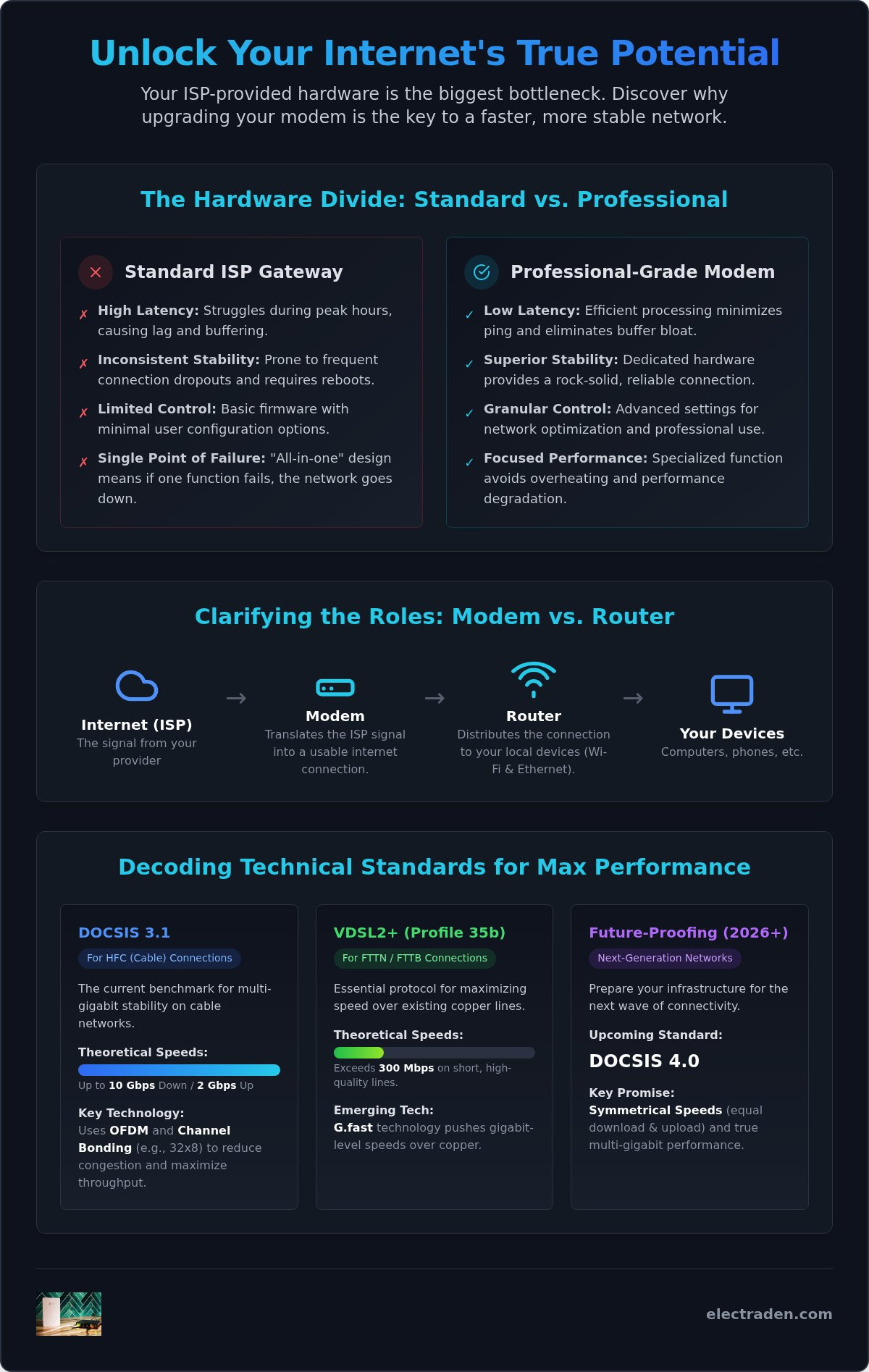
A common point of confusion is the distinction between a modem and a router. The modem’s sole responsibility is bringing the signal from the street into your premises. The router then takes that signal and distributes it to your various devices. Using separate, dedicated devices offers significant performance advantages. Dedicated modems allow for better heat dissipation because they aren't also trying to manage Wi-Fi signals and complex routing tables. This specialized processing ensures your connection remains stable even under heavy load. The signal path is straightforward: the signal travels from the street to the modem, then to the router, and finally to your end-user device.
Why ISP-Supplied Hardware Often Falls Short
Most Australian ISPs provide "all-in-one" gateways to simplify setup for the average consumer. However, these units are typically "lowest bidder" hardware designed for cost-efficiency rather than peak performance. You'll often encounter limited firmware control, weaker signal processing, and the need for frequent reboots to clear memory leaks. These issues are particularly prevalent during peak usage times when the hardware's limited CPU cannot handle the increased packet load. For those looking to optimize their network, we recommend using these gateways in "Bridge Mode." This setting disables the routing and Wi-Fi functions of the ISP unit. It allows the device to act as a simple modem while a professional-grade router handles your internal traffic. This configuration provides the stability of a dedicated line without the software limitations of consumer-grade equipment.
Technical Standards: DOCSIS, VDSL, and Future-Proofing
The technical standard of your modem determines the ceiling of your network performance. For cable-based HFC connections in Australia, DOCSIS 3.1 is the current benchmark. It supports theoretical speeds of up to 10 Gbps downstream and up to 2 Gbps upstream. While DOCSIS 4.0 promises symmetrical speeds and is expected to reach retail markets by late 2026, 3.1 remains the professional standard for multi-gigabit stability today. Understanding DOCSIS Technology Explained helps clarify how these standards manage data across the spectrum to maintain high-speed integrity.
For those on FTTN or FTTB connections, VDSL2 and VDSL2+ (Profile 35b) are the essential protocols. VDSL2+ can theoretically exceed 300 Mbps on short copper lines, though real-world performance depends heavily on the quality of the copper infrastructure. Advanced hardware utilizing G.fast technology is also emerging to deliver gigabit-level speeds over existing copper lines by utilizing a wider frequency range.
Throughput capacity is often defined by channel bonding, such as 32x8 configurations. This represents 32 downstream and 8 upstream channels, effectively creating more lanes for data to travel simultaneously. Modern hardware also employs Orthogonal Frequency Division Multiplexing (OFDM). This technology splits the signal into thousands of smaller sub-carriers. It significantly reduces network congestion and latency during peak usage hours by allowing for more efficient data transmission in noisy environments.
Understanding Throughput and Latency
Latency, or ping, is the time it takes for a data packet to travel to its destination and back. While your ISP plan sets the maximum speed, the hardware's ability to process packets determines the response time during high-load tasks like video conferencing or large file transfers. Higher-rated hardware is necessary for multi-gigabit plans to avoid internal processing delays. Throughput is the actual volume of data processed per second.
Preparing for 2026 Network Requirements
The landscape is shifting toward symmetrical upload and download speeds. As Australian networks transition toward more FTTP (Fiber-to-the-Premise) connections, your hardware must keep pace with these infrastructure upgrades. Future-proofing requires selecting units with 2.5GbE or 10GbE ports. Standard Gigabit ports will become a bottleneck as NBN speeds exceed 1000 Mbps. Investing in professional-grade modems ensures your infrastructure can handle these next-generation requirements without necessitating another upgrade. This proactive approach secures your network stability as data demands continue to scale.
Standalone Modems vs. Integrated Modem-Routers
Choosing between a dedicated modem and an integrated gateway is a decision that impacts your network's long-term reliability. Most consumer-grade hardware combines these functions into a single chassis for convenience. However, this creates a "Single Point of Failure" within your infrastructure. If the internal routing software crashes or the Wi-Fi radio fails, your entire internet connection goes offline. Separating these devices ensures that a localized Wi-Fi issue doesn't disrupt the primary handshake between your premises and the ISP network. For a deeper look at these differences, review this comparison of Modem vs. Router functionality.
Heat management is another critical factor often overlooked in all-in-one units. Both the modulation process and high-speed Wi-Fi broadcasting generate significant thermal energy. When forced into a single, compact enclosure, these components often throttle their performance to prevent overheating. This leads to the intermittent "dropouts" many users experience during heavy peak usage. Standalone hardware allows for specialized thermal design and better airflow. This separation increases the longevity of your equipment and maintains consistent uptime during summer months in Australia.
The Performance Case for Dedicated Hardware
Enterprise and high-demand environments always separate these functions to maximize processing power. A standalone unit focuses its CPU cycles entirely on the modulation of the data stream. This specialization significantly reduces bufferbloat, which is the latency spike that occurs when your hardware's buffer is overwhelmed by a sudden influx of data. Dedicated hardware also provides the flexibility to upgrade your internal network independently. You can transition to the latest standards, such as Wi-Fi 7, by simply swapping your router while keeping your existing high-performance bridge in place. This modular approach is more cost-effective over a five-year window than replacing integrated gateways every time a new wireless standard emerges.
When an Integrated Solution is Appropriate
While dedicated hardware is the professional standard, integrated solutions have a place in specific scenarios. For small offices or home environments with minimal device counts, the simplicity of a single box may outweigh the need for maximum throughput. These units require less cabling and take up less physical space. If you choose this path, look for high-performance integrated gateways that feature robust processors and advanced cooling. These middle-ground options provide better stability than "lowest bidder" ISP units while maintaining a simplified footprint for users who don't require granular network control.
Selecting the Right Modem for Your Infrastructure
Selecting a modem requires more than a cursory glance at the box's speed rating. You must first audit your physical infrastructure to ensure compatibility with national network standards. Your internal cabling, such as Cat6a or Cat7, dictates the required port speeds on your hardware. If your backbone supports 10GbE, using a unit with 1GbE ports creates an immediate bottleneck. Additionally, professional environments often require advanced management features like Simple Network Management Protocol (SNMP). This allows for remote monitoring and proactive troubleshooting before a hardware failure impacts your operations.
Matching Hardware to Connection Type
Identify your specific NBN delivery method as the first step in the selection process. Different technologies require distinct hardware configurations to maintain a stable handshake with the provider's network.
- HFC (Hybrid Fiber Coaxial): Ensure the hardware supports DOCSIS 3.1 to handle current multi-gigabit tiers. Verify that the unit includes at least one 2.5GbE WAN port to accommodate future speed increases.
- FTTN/FTTB (Fiber to the Node/Building): These connections require a VDSL2+ compatible device. Look for support for Profile 35b. This is necessary for reaching the highest possible speeds on these copper-based lines.
- FTTP (Fiber to the Premise): In these deployments, the Network Termination Device (NTD) installed by the wholesaler serves as the primary bridge. You don't need a traditional VDSL or Cable unit. Instead, you require a high-performance security gateway or router capable of handling the full throughput of the NTD's optical connection.
Enterprise Features for the Modern Home Office
Professional-grade hardware offers physical and functional advantages that consumer units lack. Consider rack-mountable form factors for clean, organized deployments in server cabinets. This prevents cable clutter and improves airflow in high-density setups. For businesses where uptime is non-negotiable, prioritize hardware with dual-WAN support. This allows for seamless 4G or 5G failover if your primary fixed-line connection drops. Professional modems also manage significantly higher concurrent connection limits. This is vital for environments with numerous IoT sensors, security cameras, and smart office devices.
To secure the right hardware for your specific connection type, browse our range of professional-grade modems and networking solutions.
Deploying Professional-Grade Solutions with ElectraDen
Professional networking requires hardware that exceeds the capabilities of consumer-grade retail units. ElectraDen serves as the premier source for this high-performance infrastructure, bridging the gap between standard internet access and enterprise-level reliability. We act as a seasoned consultant for our clients, specializing in premium brands like Ubiquiti to ensure every modem and gateway in your stack meets rigorous technical standards. Our focus is on providing the specialized hardware that ISPs often overlook. This gives you the stability and throughput required for modern business continuity and high-density home office environments.
Procurement for Business and Enterprise
Efficiency is central to our operational model. We maintain over 12,000 items in stock at our national distribution centers to ensure immediate availability for urgent deployments or large-scale office fit-outs. Business clients can leverage our dedicated support team to navigate complex hardware selection. This ensures every component integrates perfectly with your specific NBN connection type, whether it's HFC or VDSL2. For organizations managing multiple sites or complex infrastructures, we offer volume-based pricing that makes professional-grade hardware accessible at scale. This methodical approach to procurement reduces lead times. It allows your IT team to focus on deployment rather than chasing individual SKUs or managing multiple vendors across different platforms.
The ElectraDen Advantage: Quality Over Commodity
Investing in high-end technology is a strategic decision that significantly reduces long-term maintenance costs and operational overhead. Commodity hardware often requires frequent manual resets. It also suffers from firmware vulnerabilities that compromise internal security. In contrast, professional-grade solutions prioritize sustained uptime and offer the granular control required by modern network administrators. By selecting a high-performance modem from our curated range, you eliminate the common failure points associated with "lowest bidder" hardware provided by ISPs. This reliability translates to fewer support tickets and a more resilient network backbone for your staff. Our commitment to professional-grade technology standards ensures your infrastructure remains compatible with upcoming network shifts through 2026.
Take control of your network's potential today. Upgrade your network infrastructure with ElectraDen’s professional modem range to secure a faster, more stable connection for 2026 and beyond.
Securing Your Network for the Next Generation of Connectivity
Upgrading your network infrastructure is a strategic investment in long-term stability. By separating your modem from routing functions and matching hardware to your specific NBN connection type, you eliminate the performance bottlenecks inherent in standard ISP equipment. This modular approach ensures your system is ready for the multi-gigabit demands of 2026. Professional-grade hardware provides the thermal management and processing power required to handle high-density data traffic without the risk of frequent dropouts.
ElectraDen is your dedicated partner in this transition. We maintain over 12,000 networking products in stock to ensure your project stays on schedule. Our team provides expert technical support for complex business deployments and volume pricing for enterprise clients. Whether you're optimizing a high-end home office or a corporate fit-out, we provide the technical clarity and high-end hardware needed for peak performance.
Browse Professional-Grade Modems and Networking Hardware
Your network is the backbone of your digital operations. We look forward to helping you build a faster, more resilient infrastructure that supports your long-term goals.
Frequently Asked Questions
Do I need a new modem if I upgrade my internet plan speed?
Yes, you generally need to upgrade if your current hardware's technical standard is lower than your new plan's throughput. For instance, moving to a 1000 Mbps NBN tier requires a modem that supports DOCSIS 3.1 or advanced VDSL profiles. Older units often feature processors that cannot handle these high-speed data streams, leading to thermal throttling and inconsistent speeds. Always verify your hardware's port ratings to ensure they match your new plan's capacity.
Can I use any modem with the NBN in Australia?
No, compatibility depends entirely on your specific NBN connection type. FTTP users require a router that connects to the optical NTD, while HFC users need a DOCSIS 3.1 compatible cable bridge. FTTN or FTTB connections specifically require hardware that supports VDSL2 standards. Always verify that a device is certified for use on the national network before purchasing to avoid handshake issues. Using incompatible hardware can result in complete connectivity failure or significantly reduced speeds.
What is the difference between a modem and a modem-router?
A standalone modem acts as a bridge between the ISP and your network, while a modem-router combines that bridge with a wireless access point and network switch. As discussed earlier, separating these functions into dedicated hardware is the professional standard. It provides better heat dissipation and prevents a single point of failure from taking your entire system offline. This modularity allows you to upgrade your WiFi standards without replacing your primary internet bridge.
How long do modems typically last before needing an upgrade?
Professional-grade hardware typically lasts five to seven years before technical standards or component degradation necessitate an upgrade. While a device might still power on, older units often lack the processing power to handle modern encryption or the high concurrent connection counts of 2026 smart environments. Upgrading every few years ensures compatibility with infrastructure shifts, such as the transition from DOCSIS 3.0 to 3.1. This proactive approach prevents hardware from becoming the weakest link in your network stack.
What is Bridge Mode and when should I use it?
Bridge Mode is a configuration setting that disables the routing and WiFi functions of an integrated gateway, allowing it to act as a simple bridge. You should use this when you want to pair an ISP-supplied unit with a high-performance router like those from Ubiquiti. This setup prevents Double NAT issues and ensures that your professional-grade router handles all traffic management and security protocols. It is the preferred method for users seeking granular control over their network.
Does a better modem actually improve gaming performance or ping?
Yes, high-quality hardware reduces latency by processing data packets more efficiently and minimizing bufferbloat. While your raw ping is largely determined by your ISP's routing and physical distance to servers, an inferior unit can add jitter or delays during peak usage. Professional hardware utilizes advanced signal processing and OFDM technology to maintain a stable, low-latency connection even when multiple devices are active on the same network, which is critical for competitive gaming.
What technical specs should I look for in a business-grade modem?
Prioritize hardware that features 2.5GbE or 10GbE WAN ports, support for DOCSIS 3.1 or VDSL2 Profile 35b, and robust heat sinks for 24/7 operation. Business environments also benefit from SNMP support for remote monitoring and high concurrent connection limits. If your operations require absolute uptime, look for units that support dual-WAN configurations or 4G/5G failover to protect against fixed-line outages. These features ensure business continuity and support the heavy data demands of modern office infrastructure.
Can a modem be used as a WiFi router?
A standalone device cannot broadcast WiFi signals because it lacks the necessary wireless radios and routing software. It only translates the signal from your ISP into a digital format for one device. To share that connection wirelessly across multiple devices, you must connect the bridge to a router. Integrated gateways can perform both tasks, but they often sacrifice performance and range compared to dedicated wireless access points and professional security gateways used in high-density environments.