
Most network administrators accept a compromise where robust protection inevitably leads to crippled throughput. It's a frustrating reality when a new network - security utm device becomes the very bottleneck it was meant to protect. You're likely tired of juggling disparate security subscriptions and worrying about the invisible gaps between siloed hardware. Managing a complex stack shouldn't require a massive dedicated team or a constant sacrifice in connectivity performance.
This guide provides the technical clarity needed to master Unified Threat Management hardware selection for 2026. You'll discover how to secure your infrastructure with a single, consolidated appliance that maintains high-speed throughput even during rigorous packet inspection. We'll break down the essential hardware specifications, evaluate performance benchmarks for modern professional workloads, and help you select an appliance that delivers enterprise-grade reliability to your entire network infrastructure.
Key Takeaways
- Consolidate your security stack by integrating firewalls, VPNs, and intrusion prevention into a single, manageable hardware solution.
- Prioritize high-performance processing and RAM to ensure your appliance handles real-time packet inspection without sacrificing network speed.
- Select a network - security utm that matches your infrastructure's port density and throughput requirements, including 10Gbps support.
- Size your hardware based on concurrent sessions and active user counts to maintain consistent protection across your professional network.
- Streamline procurement by accessing specialized support and a vast inventory of professional-grade hardware designed for seamless integration.
What is a Network Security UTM Appliance?
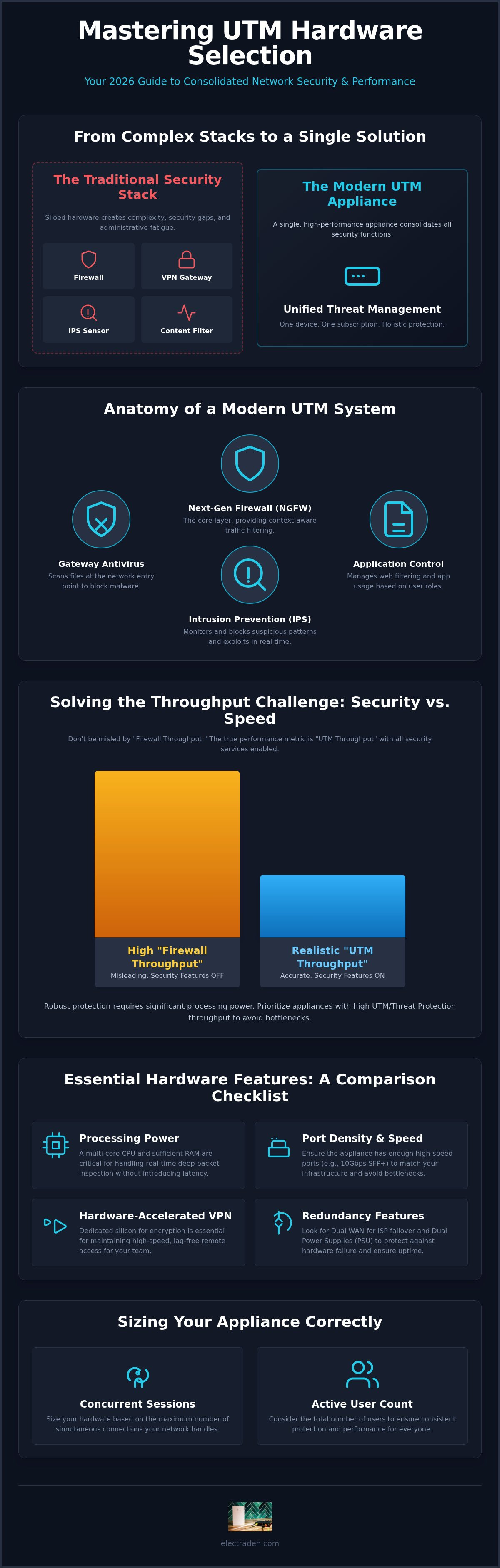
Unified Threat Management (UTM) represents the evolution of network defense from isolated point products to a single, high-performance hardware appliance. Unlike traditional setups that require separate devices for traffic filtering and encrypted tunnels, a modern network - security utm integrates these critical functions into a consolidated architecture. This hardware-centric approach allows your infrastructure to process a firewall, VPN, Intrusion Prevention System (IPS), and content filtering through a unified inspection engine.
The primary driver for this shift is operational efficiency. Managing multiple security subscriptions across different hardware vendors creates invisible gaps and administrative fatigue. By consolidating these services, professionals eliminate the "patchwork" effect and gain a holistic view of their network health. In 2026, these appliances have evolved beyond simple packet filtering into sophisticated deep packet inspection engines capable of identifying threats within encrypted traffic without sacrificing line-rate speeds.
The Anatomy of a Modern UTM System
At its core, a UTM unit utilizes a Next-Generation Firewall (NGFW) as its foundational layer. This isn't just about blocking ports; it's about understanding the context of the traffic flow. Modern systems incorporate several specialized layers to ensure comprehensive protection:
- Gateway Antivirus and Anti-malware: Scans files at the entry point of your network, preventing threats from reaching end-user devices.
- Intrusion Prevention System (IPS): Actively monitors for suspicious patterns and known exploits to block attacks in real time.
- Application Control: Allows administrators to manage web filtering and productivity tools based on user roles, ensuring security policies align with business requirements.
UTM vs. Traditional Security Stacks
Traditional security stacks often resemble a siloed collection of hardware, each requiring its own updates and monitoring. This fragmentation leads to configuration errors and slow response times. A network - security utm appliance replaces this complexity with a centralized management dashboard. You gain a single point of control for your entire security posture, which simplifies audits and troubleshooting significantly.
Cost-efficiency is another major advantage. Instead of maintaining four or five different support contracts, you move to a single subscription model for all integrated services. This streamlined procurement process, combined with specialized hardware designed for high-throughput inspection, ensures enterprise-grade protection is accessible for both home offices and large-scale corporate infrastructures. It's the logical core for any modern network that prioritizes performance and seamless integration.
Essential Hardware Features: What to Compare
Selecting a network - security utm appliance requires a shift in focus from software features to raw hardware capabilities. While many vendors highlight their security suites, the underlying silicon determines if your network remains responsive under heavy load. Processing power is paramount. Real-time packet inspection is a computationally expensive task. You need a multi-core CPU and sufficient RAM to handle high-volume traffic without introducing latency or dropping packets during peak usage.
Port density and speed are equally critical. As 10Gbps infrastructure becomes the baseline for professional environments, your security appliance shouldn't serve as a bottleneck. Look for SFP+ ports and high-speed RJ45 interfaces that match your internal switch capacity. Additionally, hardware-accelerated VPN engines are essential for maintaining high-speed remote access. Without dedicated silicon for encryption, your remote staff will experience significant lag while accessing internal resources.
Reliability hinges on redundancy. Dual WAN support allows for seamless failover if your primary ISP drops, while dual power supplies protect against local hardware failure. According to Fortinet's definition of UTM, these integrated features must work in harmony to provide a robust security posture. If you're building a resilient stack, ensure your appliance integrates seamlessly with professional modems to maintain consistent WAN connectivity across your infrastructure.
Throughput Metrics That Actually Matter
Don't rely solely on "Firewall Throughput" numbers. This figure typically represents performance with all security features disabled. Instead, evaluate the "UTM Throughput" or "Threat Protection Throughput" metrics. These provide a realistic view of performance when IPS, antivirus, and application control are active. Similarly, check the IPS throughput to see how fast the device scans for active intrusions. If your office scales, verify that the VPN throughput can handle your concurrent user count without hitting a performance ceiling.
Physical Build and Professional Standards
Form factor matters for thermal management and longevity. Desktop units are convenient for small offices, but rack-mount appliances offer superior airflow and better integration into professional server environments. High-quality chassis design ensures long-term reliability in 24/7 environments where heat buildup can lead to hardware degradation. You can view our inventory of professional-grade appliances to find the right physical fit for your existing rack space and cooling capabilities.
Solving the Throughput Challenge: Security vs. Speed
The most frequent objection to deploying a network - security utm is the fear of significant performance degradation. It's a valid concern. When an appliance performs Deep Packet Inspection (DPI), it examines every packet's payload rather than just the header. This process is computationally intensive. On underpowered hardware, it leads to noticeable latency and reduced browsing speeds. However, the trade-off between security and speed isn't a mandatory compromise in 2026.
Modern infrastructure relies on hardware-offloading engines to handle the heavy lifting. Instead of forcing the general-purpose CPU to manage every security task, professional-grade appliances distribute the load. This ensures that even with full threat protection active, your network maintains the high-speed throughput required for modern professional applications. Strategic hardware selection allows you to maintain enterprise-grade protection without the bottlenecking issues that plagued earlier generations of security hardware.
Hardware Offloading and ASIC Technology
Specialized chips, often referred to as Application-Specific Integrated Circuits (ASICs), are the secret to maintaining wire-speed performance. These processors are designed specifically for security tasks like encryption and packet filtering. By offloading these functions from the main CPU, a network - security utm can process traffic at gigabit speeds without the lag common in software-only solutions. This level of performance is critical when securing sensitive infrastructure like IoT gateways and smart devices, which often generate high volumes of small packets that can overwhelm standard processors.
Optimizing UTM for High-Bandwidth Networks
Strategic configuration allows you to balance security depth with business-critical speed. You don't always need to inspect every bit of traffic with the same level of scrutiny. Selective inspection allows you to prioritize critical business traffic while applying lighter filtering to trusted sources. You can also schedule resource-heavy tasks, such as signature updates and full background scans, to occur during off-peak hours to preserve bandwidth for daytime operations. SSL Inspection is the process of decrypting traffic to find hidden threats without sacrificing modern speed. Implementing this correctly ensures that encrypted malware can't bypass your defenses. By utilizing hardware-accelerated decryption, professional appliances manage this task with minimal impact on the user experience. Balancing these settings ensures your infrastructure remains both impenetrable and highly responsive.
Sizing Your Security: Choosing the Right Appliance
Selecting the right network - security utm isn't just about matching a spec sheet to your current headcount. You must account for the total number of concurrent devices, not just employees. In a modern professional setting, one user often represents three or more active connections across laptops, smartphones, and tablets. If your hardware can't handle these concurrent sessions, you'll experience the exact performance degradation and connection drops we discussed in previous sections. Buying for your projected growth over the next 3 to 5 years prevents costly forklift upgrades as your team or data requirements expand.
Concurrent sessions represent the number of active communication paths open at any given time. High-traffic applications like video conferencing, cloud-based databases, and real-time synchronization tools consume these sessions rapidly. If your hardware ceiling is too low, new connections will be refused, causing service interruptions even if your total bandwidth is underutilized. Future-proofing your infrastructure means selecting an appliance that can handle the increased packet inspection load as your business transitions to more encrypted, high-bandwidth services.
Appliance Tiers for Different Business Needs
Hardware capacity is generally categorized into three distinct tiers to help you find the right balance of performance and cost. Entry-level units are suited for remote offices or home-based professionals. These units provide robust security without the footprint of rack-mount gear. Mid-range appliances are optimized for growing businesses with 50 to 100 users, offering higher port density and better thermal management for sustained 24/7 operation. Enterprise-grade units are designed for mission-critical infrastructure where high availability and redundant power are non-negotiable requirements for maintaining continuous uptime.
Deployment and Specialized Support
The physical placement and integration of your network - security utm appliance directly affects its efficacy. It must sit at the edge of your network, acting as the primary gatekeeper for all incoming and outgoing traffic. For the best results, integrate your appliance with professional Ubiquiti networking equipment for business to ensure a unified management experience across your entire stack. This level of hardware synergy eliminates the "invisible gaps" often found in multi-vendor environments.
Professional deployment also involves considering the physical environment. Rack-mount units in a climate-controlled server room will naturally outlast desktop units placed in unventilated cabinets. For organizations managing multi-site rollouts, utilizing volume pricing through a dedicated partner streamlines procurement and reduces the total cost of ownership. We maintain over 12,000 items in stock to support rapid deployment and provide specialized support for business-scale procurement. You can consult with our infrastructure specialists to ensure you're selecting hardware built for these specific professional standards.
The ElectraDen Collection: Professional UTM Solutions
Securing your infrastructure requires more than just technical knowledge; it demands immediate access to the right hardware. We maintain over 12,000 items in stock to ensure your chosen network - security utm appliance is available without the delays common in specialized procurement. Our national shipping infrastructure supports fast deployment, allowing you to implement enterprise-grade protection on a professional timeline. We focus on equipment that meets rigorous professional standards, catering to both mission-critical enterprise environments and high-performance home offices.
Standout Products in Our UTM Collection
Our collection features hardware from the most trusted names in network security, ensuring you have the right tool for your specific throughput needs. Consider these professional-grade options:
- Ubiquiti Dream Machine Pro: This all-in-one console simplifies management by integrating a security gateway, switch, and controller into a single rack-mount unit.
- Fortinet FortiGate Series: These appliances provide industry-leading packet inspection and threat protection for enterprise clients requiring massive scalability.
- Netgate pfSense Appliances: These units offer high-flexibility security for technical administrators who require granular control over their firewall and routing rules.
Why Source Your Security Hardware from ElectraDen?
We take a consultative approach to every hardware request, acting as a dedicated partner in your infrastructure growth. This expertise ensures that your security appliance integrates perfectly with our range of professional modems and high-resolution business displays. We understand that a security gap anywhere is a risk everywhere. By sourcing your entire stack from a single specialist, you eliminate compatibility issues and streamline your support channels.
Our team provides specialized assistance for bulk procurement, helping you manage multi-site rollouts with volume-based pricing and coordinated logistics. We don't just sell equipment; we provide the logistical backbone for your network's defense. Browse our full Network Security UTM collection here to find the exact hardware required for your 2026 security roadmap. Whether you're upgrading a single site or a national branch network, we have the inventory and expertise to support your deployment.
Securing Your Infrastructure for the Long Term
Consolidating your security stack into a single, high-performance appliance is the most effective way to eliminate invisible hardware gaps and management fatigue. Selecting the right network - security utm requires prioritizing raw processing power and hardware-accelerated engines to maintain throughput during deep packet inspection. By sizing your hardware for both current concurrent sessions and projected growth over the next few years, you ensure your infrastructure remains a facilitator of speed rather than a bottleneck.
Managing professional-grade infrastructure doesn't have to be a fragmented or overwhelming process. With over 12,000 items in stock and specialized support for business procurement, we provide the logistical reliability required for national rollouts or advanced home office setups. Our team helps you navigate the complexities of hardware selection with a focus on performance and seamless integration. It's about finding the balance between impenetrable defense and the high-speed connectivity your professional environment demands.
Secure your network with our professional-grade UTM collection and invest in a defense strategy built on industry-leading standards. You're now equipped to build a resilient, high-speed environment that protects your most critical assets with confidence.
Frequently Asked Questions
What is the difference between a standard firewall and a UTM appliance?
A standard firewall focuses primarily on stateful packet inspection and blocking specific ports or IP addresses. A UTM appliance integrates multiple security layers into a single unit, including antivirus, intrusion prevention, and web filtering. It provides much deeper visibility into your traffic. While a firewall acts as a simple gatekeeper, the UTM functions as a comprehensive inspection station that analyzes the content of every packet entering your network.
Do UTM appliances require a monthly subscription?
Most professional-grade units require an ongoing subscription to maintain their effectiveness. These fees fund the continuous updates for malware signatures, intrusion patterns, and web filtering databases. Without an active subscription, your hardware will still function as a basic firewall and router, but it loses the real-time threat intelligence needed to block modern exploits. Always factor these recurring costs into your long-term infrastructure budget.
Can a UTM appliance replace my existing router?
Yes, these appliances are designed to serve as your primary gateway and router. They manage essential tasks like DHCP, NAT, and VLAN routing while simultaneously applying security policies. Replacing a consumer router with a dedicated security appliance simplifies your network stack and removes a potential point of failure. This consolidation allows you to manage your entire edge infrastructure from one authoritative device rather than daisy-chaining multiple pieces of hardware.
How much throughput loss should I expect with UTM features enabled?
Throughput loss typically ranges from 30% to 70% depending on the specific security features you enable. Deep Packet Inspection is the most resource-intensive task. To avoid bottlenecks, don't rely on the raw firewall throughput spec. Instead, verify the "Threat Protection Throughput" rating. This figure represents real-world performance with all layers active. High-end hardware uses specialized processors to minimize this penalty and maintain gigabit speeds across your infrastructure.
Is UTM hardware suitable for a smart home network?
It is highly suitable for advanced home users who manage a high density of IoT devices. Smart speakers, cameras, and hubs are frequent targets for exploits because they often lack robust internal security. A network - security utm provides a centralized defense layer that monitors these vulnerable devices for suspicious behavior. It ensures your private home network remains isolated from the common vulnerabilities found in consumer-grade smart home equipment.
What happens if the UTM hardware fails? Is there a bypass?
Professional units often include a fail-open bypass or support High Availability (HA) configurations. In an HA setup, two identical appliances work in tandem; if the primary unit fails, the secondary one takes over instantly without dropping your connection. For single-unit deployments, a hardware failure will typically result in a total loss of connectivity until the device is replaced or manually bypassed. This is why redundancy is critical for mission-critical environments.
Can I manage multiple UTM devices from a single dashboard?
Most modern vendors provide centralized management consoles for their hardware. These cloud-based or on-premise controllers allow you to push security policies and firmware updates to multiple branch offices simultaneously. You gain a unified view of your entire national infrastructure without needing to log into each device individually. This centralized approach reduces configuration errors and ensures a consistent security posture across every site in your organization.
Is Ubiquiti gear considered enterprise-grade UTM?
Ubiquiti's Dream Machine series offers enterprise-grade features specifically tailored for small businesses and professional home users. It provides a highly efficient, all-in-one console that manages security, switching, and wireless access through a single interface. While it avoids the complex licensing models of some traditional vendors, it delivers the robust packet inspection required for a modern network - security utm deployment. It's a reliable choice for those prioritizing performance and ease of management.